

Clé USB de programmation AGF-SPV3
€19,95
Passer aux informations sur le produit

3 – restants – Commandez vite


Clé USB de programmation AGF-SPV3
€19,95
Taxes incluses.
Expédition calculée lors du paiement.
📦 Livraison rapide 🛡️ Livraison entièrement assurée
Nous expédions généralement nos colis via PostNL. Pour les avions de grande taille et les envois surdimensionnés, nous utilisons les services spécialisés de DHL afin d'assurer une livraison sûre et fiable.
Notre tarif d'expédition standard est de 7,95 € aux Pays-Bas et de 13 € pour les commandes internationales. Pour les avions de grande taille (plus de 1,5 m), des frais d'expédition de 39,95 € s'appliquent en raison de la taille. Tous les frais d'expédition finaux seront calculés dans votre panier avant le paiement.
Délais de livraison :
- Pays-Bas & Belgique : 1-2 jours ouvrables.
- Allemagne, Danemark & France : 3-5 jours ouvrables.
- Reste de l'Europe : 4-8 jours ouvrables.
🇳🇱 Pays-Bas :
- 0–5 kg : 7,95 €
- 5–12 kg : 13 €
- 12–15 kg : 24,50 €
- 15–30 kg : 59,00 €
- 30–50 kg : 89,00 €
🇪🇺 UE :
- 0–4 kg : 13 €
- 4–10 kg : 39,95 €
- 10–15 kg : 89,00 €
- 15–20 kg : 115,00 €
- 20–25 kg : 145,00 €
- 25–50 kg : 240,00 €
Paiement sécurisé et fiable via
Clé USB de programmation AGF-SPV3
C'est une carte de programmation USB de type "Plug and Play", facile à utiliser pour programmer le servo AGFrc. Veuillez noter que cette carte de programmation USB ne peut être utilisée que pour les servos AGFrc avec la marque ASS, tels que les servos des séries A11, A50, A62, A66, A73, A80, A81.
Téléchargement du logiciel depuis ici vous pouvez télécharger directement le fichier ".exe" ou le fichier zip selon vos besoins.
Configuration requise
1. Tension de fonctionnement : USB (5V/500mA).
2. Système d'exploitation : Windows XP/Windows Vista/Windows 7/Windows 8 /Windows 10 (32/64 bits).
3. Application : Servos programmables AGFrc marqués  .
.
Instructions du menu logiciel
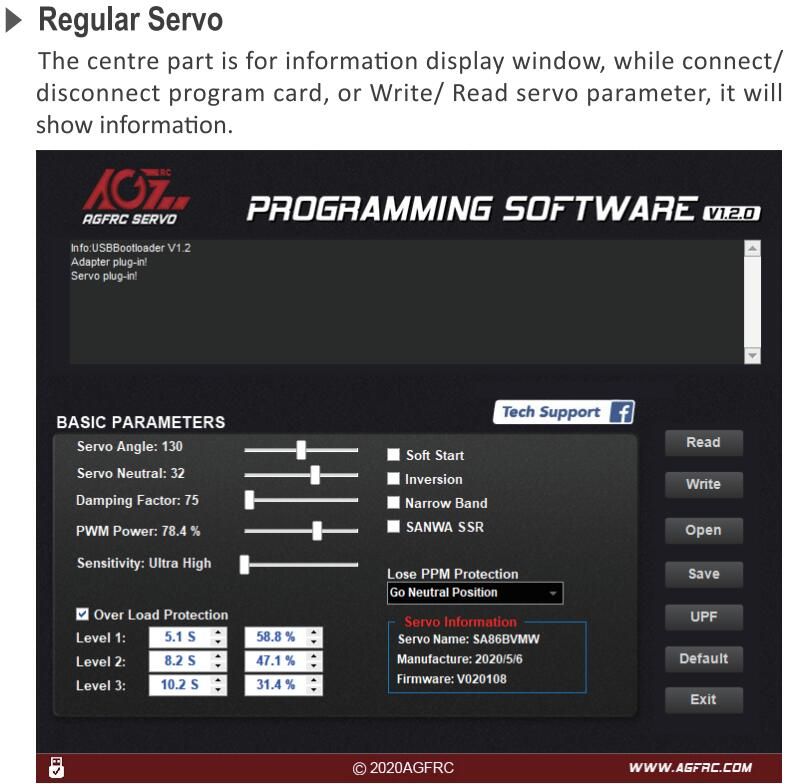
Instructions des fonctions des paramètres
1. Angle du servo : Définir l'angle de rotation du servo
2. Neutre du servo : Définir la position neutre du servo
Remarque : Lorsque la radiocommande est en position neutre, si le servo ne reste pas à la position correspondante, vous pouvez modifier cette valeur pour ajuster le bras du servo. Cela équivaut au réglage de trim du canal de la radiocommande.
3. Puissance PWM : Ajuster la puissance de sortie du servo. Plus la puissance est élevée, plus le couple et la vitesse du servo sont importants, mais la consommation de courant sera également plus élevée.
4. Facteur d'amortissement : Régler l'amortissement du servo.
5. Sensibilité : Ajuster la zone morte (sensibilité) du servo.
6. Démarrage progressif : Restauration progressive lors de la mise sous tension du servo. Une fois sous tension, le servo se déplacera doucement vers la position correspondant au signal d'entrée actuel.
Remarque : Cette fonction sert à éviter les dommages dus à un montage incorrect du servo lors de la mise sous tension.
7. Inversion : Définir la rotation normale ou inverse du servo.
8. Bande étroite : Mode FUTABA SR
9. SANWA SSR : Mode SANWA SSR
Remarque : En activant cette fonction, le servo supporte le mode haute vitesse SANWA SSR. L'angle du servo peut ne pas être précis et nécessiter un réajustement.
10. Protection perte de signal PPM : Protection en cas de perte de signal, avec trois options :
a. Libérer : Pas de protection
b. Maintenir la position : Rester à la position avant la perte de signal
c. Retour à la position neutre : Retour à la position neutre (position 1500 µs)
11. Protection contre surcharge : Définir la protection contre le blocage du servo, avec trois niveaux, cochez pour activer la protection.
Niveau 1 : Définir le temps de démarrage et la puissance de la protection primaire.
Niveau 2 : Définir le temps de démarrage et la puissance de la protection secondaire.
Niveau 3 : Définir le temps de démarrage et la puissance de la protection tertiaire.
Remarque : La partie gauche sert à définir le temps de démarrage de la protection, la partie droite à définir la puissance de sortie après activation de la protection.
12. Informations sur le servo : Informations sur le servo, incluant le modèle, la date de version et le nom du firmware.
Nom du servo : Modèle du servo
Fabricant : Date de version du servo
Firmware : Nom du firmware du servo
13. Lire : Lire les paramètres du servo depuis l'interface logicielle.
14. Écrire : Écrire les paramètres actuels dans le servo.
15. Ouvrir : Ouvrir un fichier de paramètres de servo enregistré sur l'ordinateur.
16. Enregistrer : Enregistrer les paramètres actuels du servo sur l'ordinateur.
17. UPF : Fonction de mise à jour du firmware du servo.
18. Par défaut : Restaurer les paramètres d'usine.
19. Quitter : Quitter et fermer le logiciel de configuration
Recommended Products
⛟
DHL - POSTNL
Arrivée sécurisée, livraison rapide Nous expédions votre commande le jour même ou au plus tard le jour ouvrable suivant.
Profitez d'une protection complète contre la perte ou les dommages pendant le transport—garantie.
✔
Votre satisfaction se trouve dans les détails. Nous nous engageons à offrir une qualité premium au meilleur prix possible, afin que vous n'ayez jamais à faire de compromis.
☎
Si vous avez besoin d'aide, notre équipe du service client est toujours là pour vous aider via WhatsApp, Messenger +31625000926 et Email info@rc-planes.nl
Questions fréquemment posées
What payment methods can I use?
Shop Pay
Apple Pay
Google Pay
iDEAL (via Mollie)
PayPal
Virement bancaire (paiement manuel)
Shipping & Delivery?
Nous croyons en la transparence. Tous les frais d'expédition finaux sont calculés automatiquement dans votre panier avant de passer à la caisse :
- International (hors Pays-Bas) : 17.95 €
- Grand avion (en raison des dimensions surdimensionnées)
- (1,6-2,0 m) :39.50 €
- (2,0 m-2,3 m) 89 € DHL
- (2,3 m-2,6 m) 115 € DHL
- (2,6-2,9 m) et petits jets 145 € DHL
- >2,9 m et grands jets 240 € DHL
Délais de livraison estimés
- Pays-Bas et Belgique : 1-2 jours ouvrables.
- Allemagne, Danemark et France : 3-5 jours ouvrables.
- Reste de l'Europe : 4-8 jours ouvrables.