AGF-SPV3 USB Programing USB Stick
It is the "Plug and Play" type USB program card, easy to use and program the AGFrc servo. Pls note that this USB program card just can be used for AGFrc servo with ASS mark, such as A11, A50, A62, A66 A73, A80, A81 Series Servos).
Software download from here you can download the ".exe" file directly or zip file as required.
System Requirement
1. Operating Voltage: USB(5V/500mA).
2. Operating System: Windows XP/Windows Vista/Windows 7/Windows 8 /windows10 ( 32/64bit).
3. Application: AGFrc Programmable Servos with  marked.
Software Menu Instruction
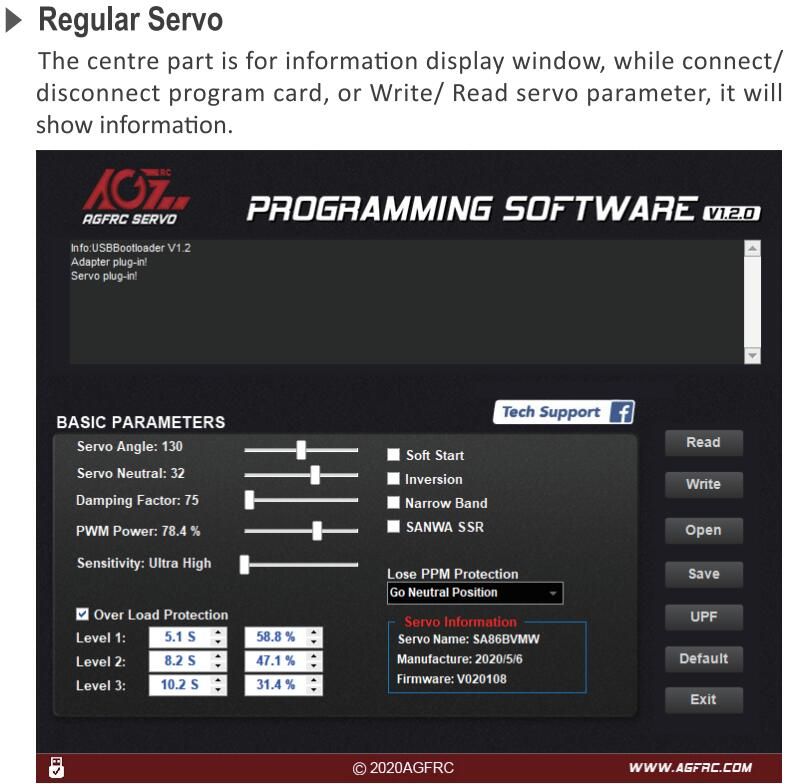
Parameter Function Instruction
1. Servo Angle: Set the servo rotation angle
2. Servo Neutral: Set the servo neutral position
Note: While the transmitter turn to the neutral position, if the servo do not stay in the corresponding position, it can modify this value to adjust the servo horn. This is equivalent to the trimming of transmitter channel.
3. PWM Power: Adjust the servo output power. The higher the power, the higher the servo torque and speed, current consumption will be high as well.
4. Damping Factor: Set the servo damping.
5. Sensitivity: Adjust the servo dead band (sensitivity).
6. Soft Start: Slowly restoration while power on the servo. Once power on, the servo will gently turn to the position of current input signal.
Note: This function is to prevent damage from servo incorrect mounting while power on.
7. Inversion: Set normal and reverse rotation of the servo.
8. Narrow Band: FUTABA SR Mode
9. SANWA SSR: SANWA SSR Mode
Note: Enable this function, it can support SANWA SSR high speed mode. Servo angle may be not accurate, it need to re-adjust.
10. Lost PPM Protect: Signal loss protection, there are three functions for selection,
a. Release: Non-Protection
b. Keep Position: Stay in the position before the signal loss
c. Go Neutral Position: Back to Neutral position (1500uS position)
11. Over Load Protect: Set the servo blocking protection, there are three levels, ticked to enable protection.
Level 1: Set the starting time and power value of the primary protection.
Level 2: Set the starting time and power value of the secondary protection.
Level 3: Set the starting time and power value of the tertiary protection.
Note: Left side is to set the protection starting time, right side is to set output power value after
enable starting protection.
12. Servo Information: Servo information. Including servo model, version date, firmware name.
Servo Name: Servo model
Manufacture: Servo version date
Firmware: Servo firmware name
13. Read: Read the servo parameter from the software interface.
14. Write: Write current parameter into servo.
15. Open: Open servo parameter file which saved on the computer.
16. Save: Save current servo parameter to the computer
17. UPF: Servo firmware upgrade function.
18. Default: Restore factory defaults.
19. Exit: Exit and close the configuration software


